
What is Causal?
Causal is a modern spreadsheet alternative designed for financial modeling, data visualization, and interactive decision-making. It combines the best elements of spreadsheets and programming, making number crunching faster, more collaborative, and accessible.

Who is Causal For?
- Startup Founders & CFOs – Causal can quickly create budgets, forecasts, and hiring plans
- Financial Analysts – Its feature can automate reporting and integrate real-time data from accounting tools
- Operations & Strategy Teams – It has model business scenarios and track key performance indicators (KPIs)
- Investors & VCs – It can analyze company financials and build valuation models efficiently
Key Features
- Readable Formulas – Causal plain English formulas eliminate the need for complex cell references and syntax
- Scenario Planning – It easily compares what-if scenarios and model outcomes with uncertainty ranges
- Live Data Integration – It can connect to QuickBooks, Xero, Stripe, HRIS, CRMs, and other platforms for real-time financial tracking
- Financial Modeling – It can create detailed budgets, forecasts, and hiring plans effortlessly
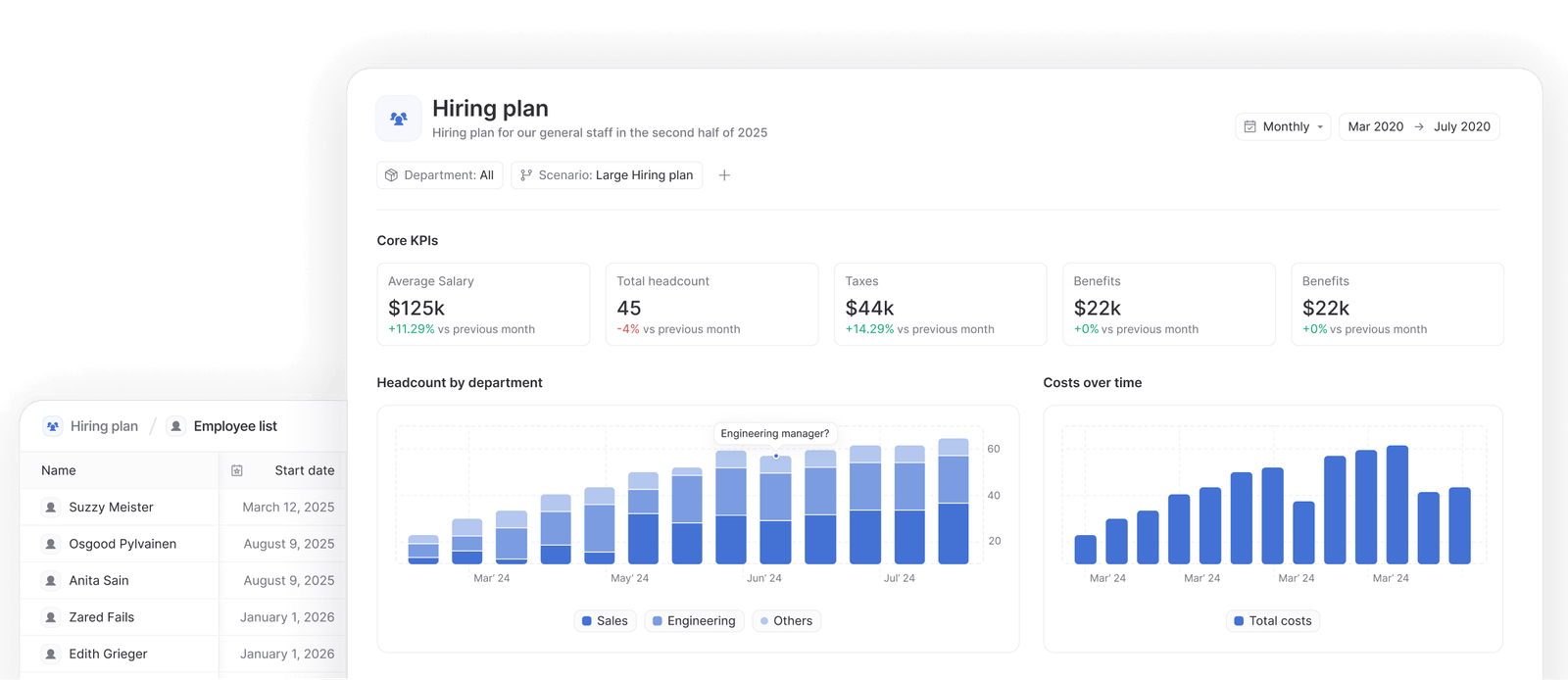
- Collaboration & Sharing – It has interactive dashboards which allows teams to edit, comment, and make data-driven decisions together
- Version Control – It can track model performance over time and compare against historical data
How It Works
1️⃣ Connect Your Data – Authenticate with QuickBooks, Xero, or other tools to pull financial data directly into Causal.

2️⃣ Run the AI Wizard – The AI-driven assistant analyzes your data and generates an initial financial model.
3️⃣ Customize Your Model – Adjust assumptions, input data, and create new scenarios.
4️⃣ Generate Visual Dashboards – Automatically generate charts and tables for easy data analysis.
User Experience & Interface
Ease of Use
- Readable, intuitive formulas
- Minimal learning curve
- Seamless integrations
Platform Availability
- Web-based access
- No installation required
- Accessible from any browser
Speed & Performance
- Fast processing and calculations
- Handles complex models efficiently
- Scalable for growing businesses
If you want to see similar tools from this category here are Shopify review and TokAnalyzr review
Plans & Pricing
Lite Plan ($250/month)
- Ideal for 10-100 person companies
- Includes 2 editors ($49/month for extra editors)
- 1 standard data connection (e.g., QuickBooks, Xero, Stripe)
- Unlimited models, dashboards, and viewers
Growth Plan (Custom Pricing)
- Designed for larger organizations (100-1000 employees)
- Custom number of editors and premium data sources (e.g., NetSuite)
- Unlimited models, dashboards, and viewers

User Ratings & Reviews
Shnoco Overall Rating: ⭐⭐⭐⭐ (4/5)
- Ease of Use: ⭐⭐⭐⭐⭐ (5/5)
- Value for Money: ⭐⭐⭐ (3/5)
- Design Flexibility: ⭐⭐⭐⭐ (4/5)
- Stability: ⭐⭐⭐ (3/5)
- Scalability: ⭐⭐⭐⭐⭐ (5/5)
- Security: ⭐⭐⭐⭐⭐ (5/5)
User Testimonials
📢 "The rate of product improvements from Causal is incredible. Classdojo runs all forecasts, scenarios, and financial planning in it without a single full-time employee managing the function." – Mike Overell
📢 "I’ve been using Causal to rebuild our financial model, and it’s a breath of fresh air compared to the fragile, static models in Excel/Sheets." – Jeremy Higgs
Alternatives & Competitors
🔸 Airtable
- Pricing: Free plan included; Paid monthly pricing starts at $20/month
- Key Differences: More structured database-like functionalities, but less flexibility for financial modeling
- Pros: User-friendly UI, great for collaboration
- Cons: Limited scalability for large datasets
🔹 Google Sheets
- Pricing: Free plan included; Paid monthly pricing starts at $6.30/month
- Key Differences: Simpler interface but lacks native automation and API integrations
- Pros: Free, cloud-based, widely adopted
- Cons: Limited automation and API capabilities
🔸 Smartsheet
- Pricing: Paid monthly pricing starts at 9$
- Key Differences: Project management-focused with robust reporting tools
- Pros: Great for task management, automation features
- Cons: Steeper learning curve
Why Choose Causal Over Alternatives?
- More automation & AI-powered insights than Google Sheets
- More flexible and scalable than Airtable
- Better financial modeling capabilities than Smartsheet
Final Thoughts
Causal is an excellent choice for businesses looking to move beyond traditional spreadsheets for financial planning and data analysis. Its interactive dashboards, real-time integrations, and scenario modeling make it a powerful tool for teams that require dynamic financial forecasting.
While it may not be the cheapest option, its scalability and automation capabilities justify the investment for data-driven organizations.
💡 Rating: ⭐⭐⭐⭐ (4/5) Causal is one of the top-tier spreadsheet alternative for financial modeling in the market which offers a seamless automation, live data integration, and powerful scenario planning.

